
SaaS vs. Custom Software: Which Is Right for Your Business?
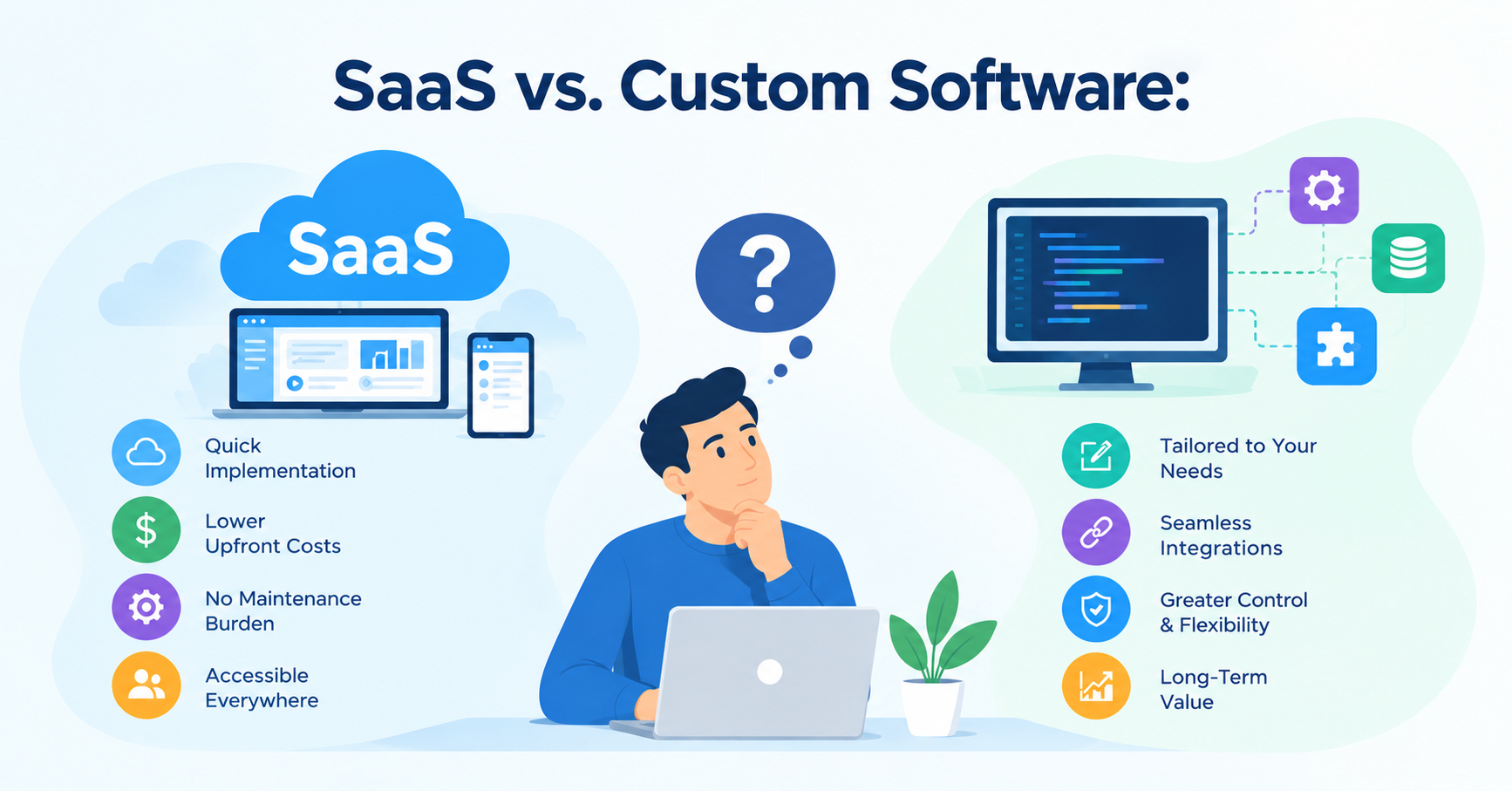
Choosing the right software is an important decision for any business. The right solution can streamline daily operations, improve productivity, reduce manual work, and support long-term growth. However, with so many software options available, businesses often face a common question: should they subscribe to an existing Software as a Service (SaaS) product or invest in custom software built around their specific requirements?
Both approaches offer advantages, but they solve different problems. SaaS products provide ready-to-use functionality through a subscription model, while custom software is designed to meet an organization's unique workflows, integration requirements, and business objectives.
The decision is not simply about choosing the cheaper option. Businesses must consider implementation time, ongoing costs, flexibility, scalability, data control, and the effort required to maintain the solution.
In this guide, we'll compare SaaS and custom software, explain when each option makes sense, and explore how businesses can make an informed decision.
What Is SaaS?
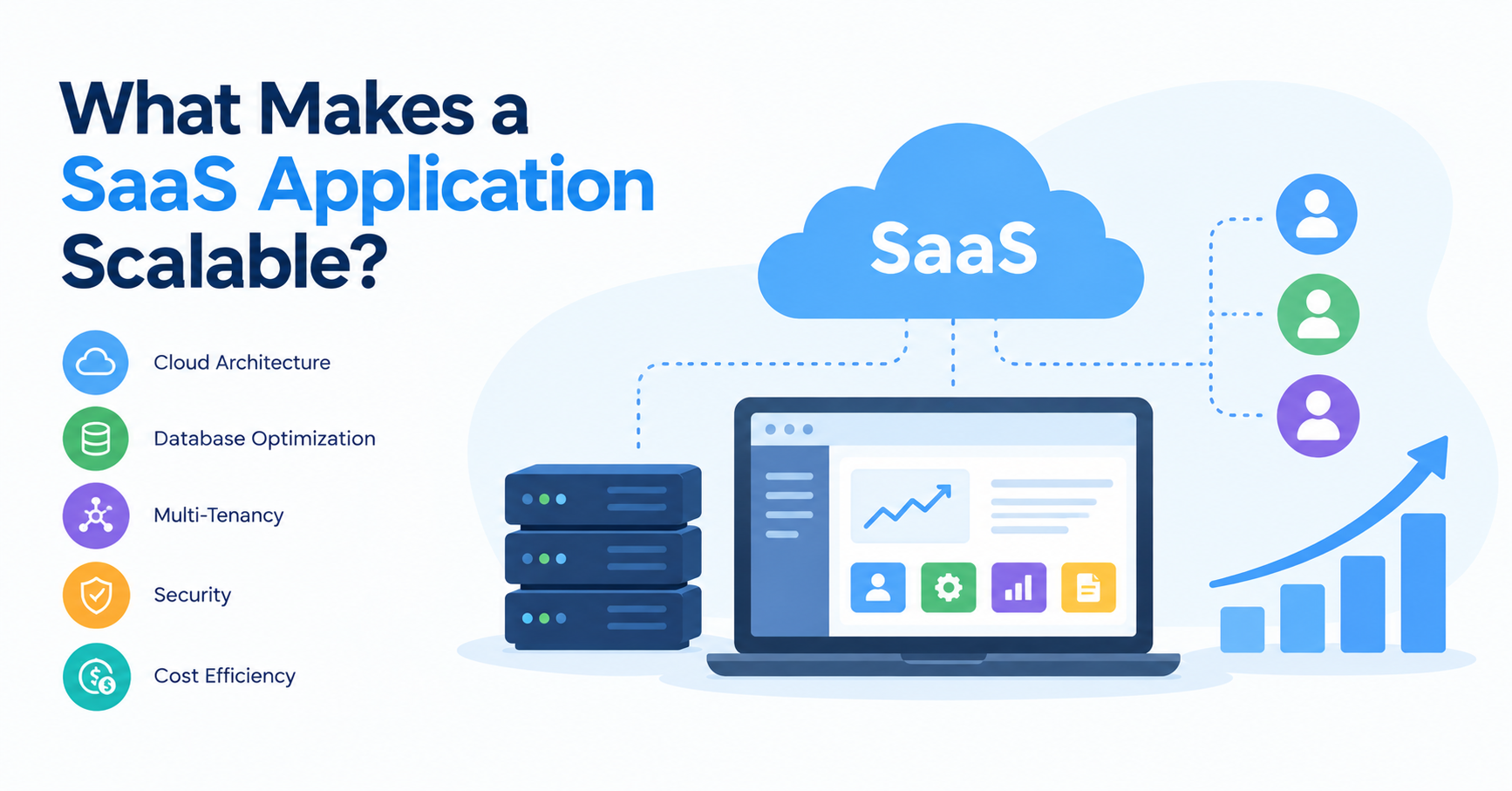
Software as a Service (SaaS) is a software delivery model in which an application is hosted and maintained by a provider and made available to customers over the internet. Users typically access it through a web browser or mobile application and pay a recurring subscription fee.
Common examples include customer relationship management (CRM) systems, accounting platforms, project management tools, email services, and human resource management applications.
With SaaS, the provider generally manages the underlying infrastructure, software updates, and much of the routine maintenance. This allows businesses to use established software without building and operating the entire application themselves.
Key advantages of SaaS:-
- Faster implementation:
Most SaaS applications can be configured and introduced relatively quickly. Businesses can often start using essential features without waiting for a full development cycle.
- Lower initial investment:
Instead of funding a complete software development project, businesses typically pay subscription or usage-based fees. This can make SaaS attractive to startups and small businesses with limited upfront budgets.
- Vendor-managed maintenance:
The provider usually handles infrastructure management, routine updates, and platform improvements. This reduces the amount of technical work the customer needs to manage directly.
- Accessibility and collaboration:
Cloud-based applications allow authorized users to access information from different locations and supported devices, making them useful for distributed teams.
- Predictable starting costs:
Subscription plans can make initial budgeting easier, although charges may increase as the business adds users, storage, integrations, or premium features.
Limitations of SaaS:-
Despite these benefits, SaaS products may not accommodate every business requirement.
- Limited customization: Businesses may need to adapt their workflows to the features and settings available.
- Recurring fees: Subscription expenses continue for as long as the service is used and may grow with usage.
- Vendor dependency: Product changes, pricing, service availability, and feature roadmaps are largely controlled by the provider.
- Integration constraints: Some products have limited APIs, restricted integration options, or additional charges for connecting external systems.
- Data migration challenges: Moving information to another platform can require planning, data transformation, and additional resources.
SaaS is often a strong choice when a business needs standard functionality quickly. It becomes less suitable when its limitations repeatedly interfere with important operations.
What Is Custom Software?
Custom software is an application developed specifically for a business, industry, or operational requirement. Instead of relying entirely on the functionality of an existing product, the organization defines the features, workflows, integrations, and technical requirements it needs.
Examples include a lending platform designed around a financial institution's approval process, a property management system built around a real estate company's operations, or an internal portal that connects several existing business systems.
Unlike a standard SaaS subscription, custom software development involves designing and implementing a solution around defined business objectives. The organization may develop it with an internal team or work with a software development partner.
Businesses considering this approach can explore custom software development services to understand how purpose-built applications can address specific operational challenges.
Key advantages of custom software:-
- Tailored functionality:
Custom software can reflect the way a business actually works. Features can be designed around specific approval processes, reporting requirements, customer journeys, and operational rules.
- Greater flexibility:
The business has more influence over the development roadmap. New features, workflow changes, and integrations can be prioritized according to business needs, subject to the available budget and technical constraints.
- Purpose-built integrations:
Custom applications can be designed to communicate with existing databases, APIs, accounting systems, payment gateways, and other business tools.
- Control over the technology roadmap:
The organization can decide which capabilities to develop and when to introduce improvements, rather than relying exclusively on a third-party vendor's release schedule.
- Potential long-term value:
For businesses with complex or highly differentiated workflows, a purpose-built application may reduce repetitive manual work and eliminate the need to combine several disconnected tools.
However, custom software is not automatically cheaper or better over the long term. Its value depends on how well it addresses business needs and how effectively it is maintained.
Limitations of custom software:-
Custom development also introduces responsibilities that businesses must plan for.
- Higher upfront investment: Requirements analysis, design, development, testing, and deployment require resources before the application begins delivering value.
- Longer implementation: Complex applications may take months to develop, although a carefully scoped first release can be delivered sooner.
- Ongoing maintenance: The application needs security updates, bug fixes, monitoring, and compatibility improvements.
- Technical responsibility: The business must ensure that appropriate expertise is available internally or through a development partner.
- Scope management: Uncontrolled feature requests can increase costs and delay delivery.
Custom software works best when the benefits of a tailored solution justify the investment and the business is prepared to manage the application throughout its lifecycle.
SaaS vs. Custom Software: Key Differences
The most useful way to compare these approaches is to evaluate how each supports the business's requirements, budget, and long-term plans.
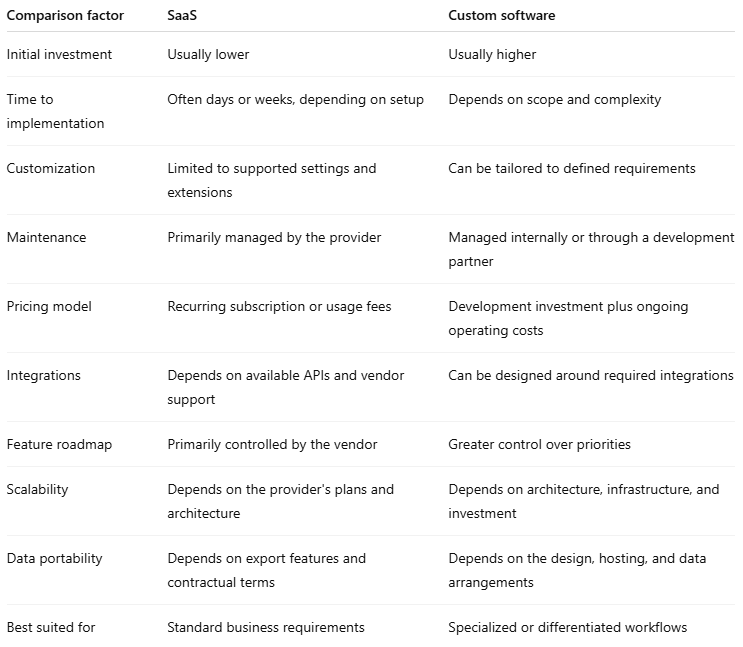
Neither option is universally superior. The right choice depends on the problem the business is trying to solve and the trade-offs it is willing to accept. Microsoft's cloud architecture guidance similarly highlights the importance of weighing customization and control against the investment and maintenance involved in building a solution.
When Should Your Business Choose SaaS?
SaaS is generally the more practical choice when the business needs are common, established products already meet most requirements, and speed matters more than having complete control over functionality.
1. Your requirements are standard:
If the business needs email, video conferencing, basic accounting, team collaboration, or standard customer relationship management, an established SaaS product may provide the necessary functionality without custom development.
Building a new application for a problem that has already been solved effectively can waste time and resources.
2. You need to get started quickly:
Businesses launching a new department, entering a market, or introducing a new process may benefit from the speed of a ready-made platform.
Instead of waiting for development, teams can configure an existing product, import relevant data, train employees, and begin using it.
3. Your budget is limited:
Startups and smaller organizations may prefer subscription software because it avoids a large initial development investment. This makes it easier to test a business process before committing resources to a tailored application.
However, the business should still evaluate recurring fees, usage limits, and the cost of additional integrations.
4. You want to minimize infrastructure responsibilities:
If the organization does not have the resources to maintain an application, a managed SaaS product can reduce the burden of infrastructure operations and routine software maintenance.
Example: A small consulting company needs a platform for scheduling meetings, managing email, and storing shared documents. Rather than developing these capabilities from scratch, it can use established SaaS products and focus its resources on client delivery.
When Should Your Business Invest in Custom Software?
Custom software becomes more attractive when existing products cannot support important workflows efficiently or when software capabilities directly influence business performance.
1. Your workflows are unique:
Some organizations follow operational processes that cannot be handled effectively by standard software.
For example, a financial services company may need a lending platform with specific eligibility rules, document verification steps, approval hierarchies, and audit requirements.
A generic product might cover part of the process, but extensive workarounds could make daily operations more complicated. A purpose-built solution can be designed around those requirements.
2. Existing tools create manual work:
Businesses sometimes combine spreadsheets, email, separate databases, and multiple applications to complete a single workflow.
Although each tool may solve part of the problem, employees may spend significant time transferring information, correcting inconsistencies, and following up manually.
Custom software can consolidate these activities and automate appropriate steps, provided the underlying processes are clearly defined.
3. You need specialized integrations:
A business may need its software to connect with legacy systems, third-party APIs, industry-specific platforms, or internal databases.
If available SaaS integrations are insufficient, custom development can provide a more suitable integration layer.
4. The software supports a competitive advantage:
When a company's unique process, service delivery model, or customer experience differentiates it from competitors, software designed around that capability may provide strategic value.
For instance, a logistics company with specialized routing and dispatch rules may benefit from software built around its operating model rather than a generic system that supports only standard workflows.
5. You need greater control over product development:
Businesses planning to develop their own digital product may require control over functionality, release priorities, and the product roadmap.
In such cases, custom development can help turn business requirements into a software product that evolves with the market.
What About the Total Cost of Ownership?
One of the most common mistakes in software selection is comparing a SaaS subscription with only the initial price of custom development.
A more meaningful comparison considers the total cost of ownership (TCO): the expenses associated with acquiring, implementing, operating, maintaining, and eventually replacing a solution.
SaaS costs may include:
- Monthly or annual subscriptions
- Per-user or usage-based charges
- Premium features and storage
- Setup and data migration
- Third-party integrations
- Employee training
- Custom extensions
- Contract termination or migration expenses
Custom software costs may include:
- Requirements analysis and planning
- UI/UX design and development
- Software development and testing
- Hosting and infrastructure
- Security monitoring and maintenance
- Future enhancements
- Internal staff or development partner costs
- Data migration and eventual replacement
Consider the following illustrative example. The figures are hypothetical and are not market averages or a quotation.
A business is comparing a SaaS platform costing ₹50,000 annually with a custom application requiring an initial investment of ₹12 lakh and ₹2 lakh in annual maintenance and operating costs.
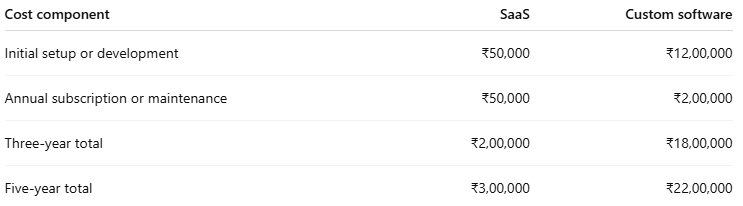
This example excludes taxes, price increases, infrastructure changes, internal labor, integrations, and switching costs. It also assumes the SaaS setup fee is ₹50,000 in the first year, followed by annual subscriptions of ₹50,000.
Under these assumptions, SaaS is substantially less expensive in direct costs. But the comparison could change if the SaaS platform requires expensive add-ons, imposes costly usage limits, or creates significant manual work that a custom application could eliminate.
The important lesson is to compare realistic costs and business outcomes over the same period, rather than assuming custom software will eventually become cheaper.
Can You Combine SaaS and Custom Software?
Yes. Many businesses do not need to choose exclusively between SaaS and custom development.
A hybrid approach combines established SaaS applications with custom integrations, automation, or purpose-built modules.
For example, a company might use an existing accounting platform but build a custom customer portal that connects to its accounting, inventory, and order management systems.
This approach can offer several advantages:
- Reduces the need to rebuild standard functionality.
- Allows businesses to tailor their most important workflows.
- Connects information across otherwise disconnected applications.
- Supports gradual modernization instead of a complete system replacement.
- Helps organizations invest development resources where they create the most value.
The key is to design the integration layer carefully. Businesses should consider API limits, data synchronization, security, error handling, and what happens if a third-party service changes its functionality.
For companies working with multiple applications, API integration expertise can help connect systems and reduce manual data transfers.
How to Choose the Right Option for Your Business
Before making a decision, evaluate your requirements against a few practical questions.
Step 1: Define the business problem.
Identify the process you want to improve and the outcome you expect. Is the goal to reduce administrative work, improve customer service, automate approvals, or launch a new digital product?
Step 2: Evaluate existing SaaS products.
Compare available products against your essential requirements. Look beyond feature lists and test whether the software supports your real workflows.
Step 3: Identify gaps and workarounds.
Document missing features, manual tasks, integration limitations, and operational risks. Distinguish essential requirements from preferences that can be addressed later.
Step 4: Compare the total cost.
Estimate subscription, implementation, integration, training, development, maintenance, and migration costs over a common period.
Step 5: Consider future growth.
Assess whether the solution can support expected increases in users, data volume, transactions, and operational complexity. Remember that scalability depends on the product's architecture and commercial terms, not simply whether it is SaaS or custom-built.
Step 6: Review security and data portability.
Understand access controls, backup arrangements, contractual data rights, export options, and the process for changing providers or platforms.
Step 7: Choose the simplest solution that meets your needs.
If SaaS covers the essential requirements without significant workarounds, it may be the best choice. If critical workflows remain unsupported and the business case justifies the investment, custom software may offer greater value.
Conclusion
The decision between SaaS and custom software should be based on business requirements rather than the assumption that one approach is always better.
SaaS development services is often the right choice when speed, standard functionality, and lower upfront costs are priorities. Custom software is worth considering when specialized workflows, integration requirements, or product differentiation make a tailored solution valuable.
For many businesses, the most effective strategy is a combination of both: use established platforms for common functions and invest in custom development where it solves a meaningful business problem.
Start by identifying your operational challenges, evaluating available products, and comparing the total cost of ownership. A clear understanding of these factors will help you choose a solution that supports both current needs and long-term business goals.
About the author
- LnP Infotech Pvt. Ltd. is an AI technology consulting and digital solutions company based in Mohali, India, serving businesses worldwide. Founded in 2018, we specialize in custom software development, AI solutions, automation, web and mobile app development, SaaS solutions, and technology consulting. Our expertise includes finance and healthcare software, real estate technology, reporting and analytics, digital transformation, and business process automation. We help businesses modernize legacy systems, streamline operations, improve efficiency, and build scalable digital products tailored to their requirements. With an experienced technology team and a practical, future-ready approach, LnP Infotech delivers reliable software and technology solutions that support sustainable business growth.
Comments
Join the discussionNo comments yet. Be the first to comment.