
How AI Agents Can Automate Business Processes in 2027
Introduction
Businesses are constantly looking for ways to improve productivity, reduce operational costs, and deliver better customer experiences. Traditional automation has helped organizations streamline repetitive tasks, but many business processes still require human judgment, communication, and decision-making. In 2027, AI agents are expected to play an increasingly important role in addressing these challenges.
Unlike conventional automation tools that follow predefined rules, AI agents can interpret instructions, analyze information, plan actions, and interact with connected systems to accomplish specific goals. Depending on their design and permissions, they can manage multiple steps in a workflow while involving employees when decisions require human expertise.
For example, an AI agent could review a customer inquiry, retrieve relevant account information, classify the request, create a support ticket, and prepare a response. If the request involves a refund or sensitive customer information, the agent could send it to an employee for approval.
As businesses explore these capabilities, AI agents for business process automation are becoming an important consideration for digital transformation strategies.
What Are AI Agents in Business Process Automation?
AI agents are software systems designed to work toward specific goals by interpreting information, making decisions within defined boundaries, and taking actions through available tools or applications.
Traditional automation generally follows fixed instructions. For instance, a workflow might send an email whenever a customer submits a form. An AI agent can go further by interpreting the customer's message, identifying the type of request, retrieving relevant information, and determining which approved workflow should follow.
AI agents can combine several technologies, including:
- Large language models (LLMs): Help interpret natural-language instructions and generate responses.
- Business rules: Establish boundaries, conditions, and approval requirements.
- APIs and integrations: Allow agents to retrieve information from and take permitted actions in business applications.
- Workflow automation: Coordinates tasks across systems and teams.
- Monitoring and evaluation tools: Help organizations review agent activity, performance, and errors.
The objective is not to remove people from every process. Instead, AI agents can handle suitable tasks and routine decisions so employees can focus on complex problems, relationships, and strategic work.
Why AI Agents Will Matter in 2027
The development of AI agents is moving business automation beyond isolated tasks toward connected, multistep processes. Organizations are exploring ways to combine AI reasoning with established workflow systems to improve how work moves between departments.
A Gartner forecast published in August 2025 projected that 40% of enterprise applications would include task-specific AI agents by the end of 2026, compared with less than 5% in 2025. This is a forecast, not a confirmed adoption figure, but it highlights the expected expansion of agent-based capabilities in business software.
In 2027, businesses will likely focus on practical applications that deliver measurable value rather than adopting AI agents simply because the technology is available.
Several factors will drive this interest:
- Increasing operational complexity: Companies use multiple applications to manage customers, finances, employees, inventory, and projects.
- Demand for faster service: Customers expect timely responses and fewer delays.
- Growing volumes of business data: Employees spend significant time collecting, reviewing, and interpreting information.
- Need for flexible automation: Businesses want workflows that can handle different types of requests and exceptions.
- Pressure to control costs: Organizations need to improve productivity without continuously increasing administrative workload.
The greatest opportunities will come from connecting AI agents to well-designed business processes rather than deploying them as isolated assistants.
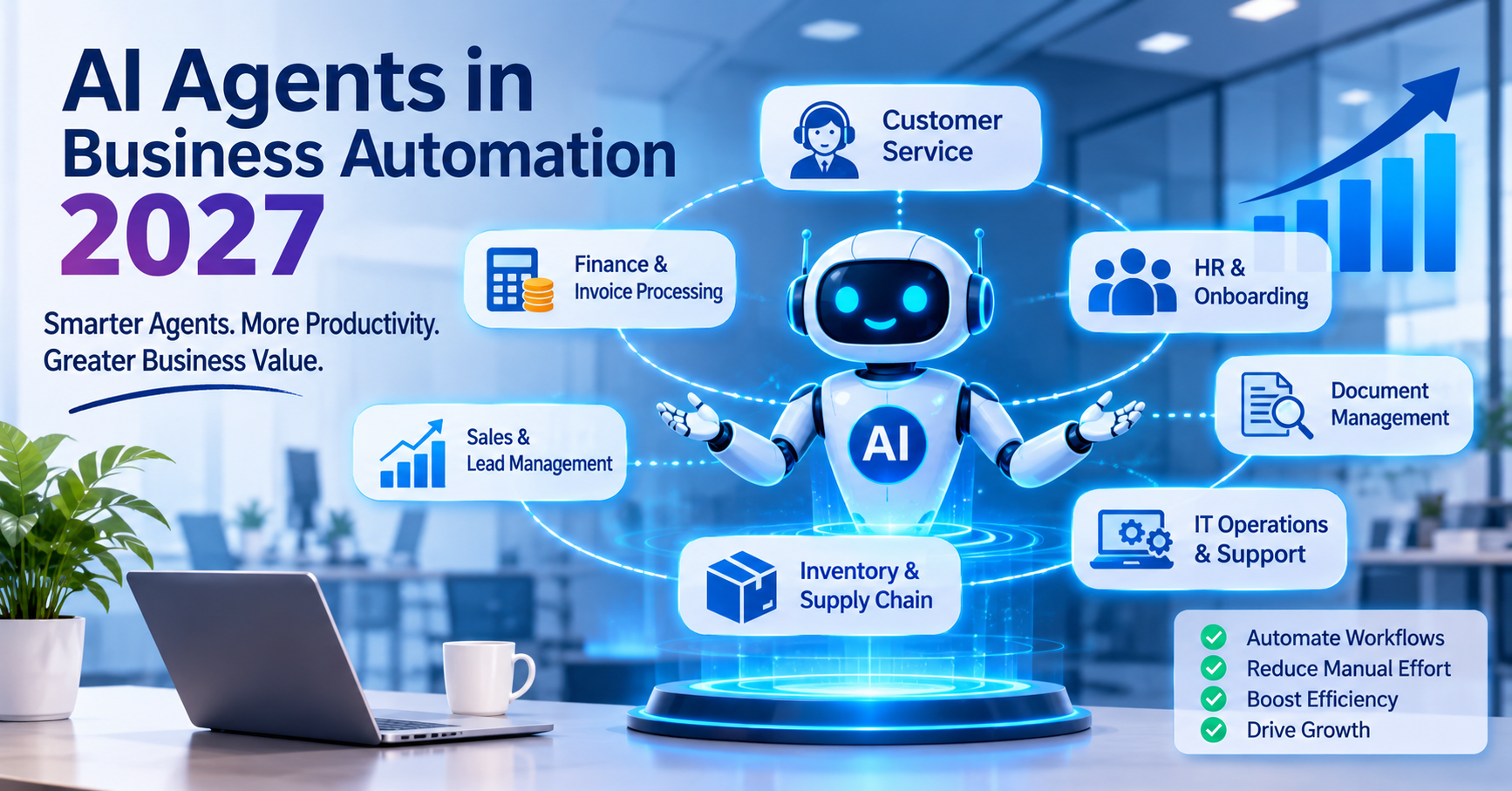
7 Ways AI Agents Can Automate Business Processes in 2027
1. Customer Service and Support Automation
Customer support teams frequently handle repetitive questions about orders, billing, product features, account access, and service requests. AI agents can help automate parts of this work.
An AI-powered support agent can interpret a customer's question, search approved knowledge sources, retrieve relevant account information, and provide a suitable response. If the issue requires further investigation, it can create a support ticket and route it to the appropriate team.
For example, an online retailer could use an AI agent to check order status, explain delivery updates, and identify delayed shipments. When a delivery problem requires intervention, the agent could prepare the relevant information for a support representative.
Potential benefits include:
- Faster responses to common inquiries.
- More consistent customer communication.
- Reduced manual ticket classification.
- Improved routing of complex requests.
- Better availability outside normal business hours.
Businesses should ensure that agents access only authorized customer data and escalate complaints, sensitive requests, and uncertain answers appropriately.
2. Finance and Invoice Processing
Finance departments manage invoices, expense claims, payment inquiries, reconciliations, and financial reporting. Many of these activities involve repetitive data collection and validation.
AI agents can help extract information from invoices, compare it with purchase orders, identify missing details, and route exceptions for review.
Consider a company that receives hundreds of supplier invoices every week. An agent could read each invoice, identify the supplier and amount, compare the information against approved purchasing records, and prepare the invoice for processing.
If the invoice contains an unexpected charge or a mismatch, the agent could flag the issue instead of approving it automatically.
Common applications include:
- Invoice data extraction and classification.
- Expense report review.
- Purchase order matching.
- Payment inquiry management.
- Financial report preparation.
- Identification of unusual transactions for investigation.
For financial workflows, organizations should retain approval controls, transaction limits, audit records, and separation of duties. AI-generated recommendations should not automatically authorize high-value payments without appropriate safeguards.
3. Human Resources and Employee Onboarding
HR teams coordinate recruitment, employee onboarding, leave requests, policy questions, and internal documentation. These processes often require information to move between several systems.
An AI agent can support employee onboarding by coordinating approved steps after a new hire accepts an offer.
For example, it could:
- Retrieve onboarding tasks from the HR system.
- Prepare a checklist based on the employee's role.
- Request the necessary documents through approved channels.
- Notify IT to prepare equipment and account access.
- Schedule orientation sessions.
- Remind responsible teams about outstanding tasks.
An HR agent could also answer routine questions about company policies using approved documentation.
However, decisions involving hiring, compensation, disciplinary action, or sensitive employee information require additional care. Human oversight should remain in place for decisions that affect employees' rights, opportunities, or employment conditions.
4. Sales and Lead Management
Sales teams often spend considerable time researching prospects, updating customer relationship management (CRM) systems, preparing follow-ups, and coordinating meetings.
AI agents can reduce this administrative burden by connecting information from approved sources and sales tools.
For instance, when a new prospect submits a website form, an agent could classify the inquiry, summarize the prospect's requirements, check for duplicate CRM records, and assign the lead according to predefined rules.
It could also prepare a personalized follow-up message for a sales representative to review.
Potential applications include:
- Lead classification and routing.
- CRM record updates.
- Meeting preparation.
- Follow-up reminders.
- Sales conversation summaries.
- Proposal preparation.
- Identification of overdue opportunities.
By automating administrative work, AI agents can help sales professionals spend more time understanding customer needs and building relationships.
Businesses should review AI-generated outreach to avoid inaccurate claims, inappropriate personalization, or communications that violate customer preferences.
5. Inventory and Supply Chain Management
Inventory management requires businesses to monitor stock levels, evaluate demand, coordinate suppliers, and respond to unexpected disruptions.
AI agents can help collect information from inventory systems, sales records, supplier updates, and delivery platforms to identify potential problems.
For example, an agent might detect that a product is selling faster than expected. It could check current inventory, review supplier lead times, prepare a replenishment recommendation, and notify the purchasing team.
Within predefined limits, the agent could initiate an approved purchase request. Larger orders or unusual supplier changes could require human authorization.
Business applications include:
- Stock monitoring and alerts.
- Demand information analysis.
- Supplier communication preparation.
- Reorder recommendations.
- Shipment status tracking.
- Exception management.
- Coordination of inventory-related tasks.
These capabilities can help businesses respond more quickly to changing conditions. However, reliable results depend on accurate inventory data, current supplier information, and well-defined purchasing policies.
6. IT Operations and Software Maintenance
IT teams manage system alerts, service requests, software updates, access requests, and technical incidents. AI agents can help investigate common issues and coordinate appropriate responses.
An IT agent could receive an alert, collect relevant logs, compare the incident with known problems, and recommend troubleshooting steps. If an approved low-risk fix is available, the agent could initiate it under established controls.
For example, an agent might identify a recurring application error, gather diagnostic information, create an incident record, and notify the responsible engineer with a concise summary.
Useful applications include:
- IT help desk ticket classification.
- Log analysis and incident summarization.
- Routine troubleshooting.
- Software documentation updates.
- Monitoring and alert prioritization.
- Support for testing and maintenance workflows.
Organizations can also connect agents to their existing software architecture through APIs and controlled service interfaces.
For businesses maintaining complex applications, legacy software modernization services can help address outdated systems and integration limitations that might otherwise restrict automation.
IT agents should operate with restricted permissions, clear rollback procedures, and human approval for production changes that could affect critical services.
7. Document Management and Internal Knowledge
Employees frequently search for information across shared drives, internal knowledge bases, email archives, and business applications. Finding the correct document can delay decisions and create unnecessary administrative work.
AI agents can help retrieve relevant documents, summarize information, classify records, and prepare responses based on approved internal sources.
For example, a project manager could ask an agent to summarize the latest project status. The agent might retrieve approved project updates, identify outstanding tasks, and prepare a report highlighting deadlines and unresolved issues.
Other applications include:
- Document classification.
- Contract information extraction.
- Policy and procedure searches.
- Report preparation.
- Meeting summary generation.
- Knowledge base maintenance.
- Identification of missing documentation.
Access controls are essential. An agent should respect the permissions of the employee making the request and should not expose confidential information simply because it can retrieve that information.
AI Agents vs. Traditional Business Process Automation
AI agents and traditional automation serve related but different purposes. Businesses do not necessarily need to replace their existing automation systems to benefit from AI.
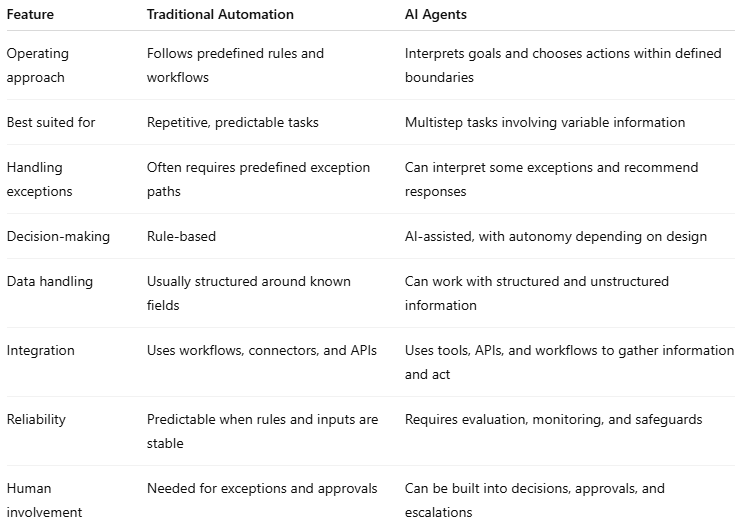
The most effective solution may combine both approaches.
For example, an AI agent could interpret an incoming invoice and identify the appropriate processing route, while a conventional workflow validates required fields, checks authorization limits, and records the transaction.
This hybrid model combines the flexibility of AI with the predictability of established automation.
Key Benefits of AI Agents for Businesses
When implemented around appropriate use cases, AI agents can offer several operational advantages.
Improved Productivity
Agents can handle information gathering, document preparation, task routing, and other administrative activities. Employees can then focus on work that requires expertise, judgment, or direct customer interaction.
Faster Process Completion
An agent can coordinate multiple steps without requiring employees to manually transfer information between every application. This can reduce waiting time in workflows involving several departments.
Reduced Manual Errors
Automated data extraction, validation, and consistency checks can help reduce certain types of manual mistakes. However, AI systems can also produce incorrect results, so important outputs still need suitable verification.
Better Use of Business Data
AI agents can retrieve and summarize information from connected systems, helping employees understand situations without manually searching multiple sources.
More Flexible Operations
Unlike purely fixed workflows, well-designed agents can interpret variations in requests and route different situations through appropriate processes.
Scalable Business Workflows
Organizations can reuse successful automation patterns across departments, provided that integrations, permissions, performance, and costs are properly managed.
These benefits are not automatic. Results depend on process quality, data availability, integration reliability, employee adoption, and the level of human oversight.
Challenges Businesses Must Address Before Adopting AI Agents
Despite their potential, AI agents introduce technical and operational challenges that organizations should address before expanding deployment.
Data Quality and Accessibility
Agents need reliable information to make useful recommendations. Inconsistent records, outdated documentation, and disconnected applications can undermine their performance.
Businesses should identify authoritative data sources, improve data quality, and establish clear access policies before deployment.
Security and Privacy
AI agents may interact with customer records, financial information, employee data, and confidential business documents. Excessive permissions could allow an agent to expose information or perform unauthorized actions.
Organizations should apply least-privilege access, secure authentication, appropriate data retention policies, and detailed activity logging.
Incorrect Decisions and Unpredictable Outputs
AI agents can misunderstand instructions, retrieve irrelevant information, or generate incorrect conclusions. They may also take inappropriate actions if their objectives or constraints are poorly defined.
Businesses should test agents against realistic scenarios, restrict high-impact actions, validate important outputs, and establish escalation procedures.
Integration With Existing Systems
Many organizations depend on older software that lacks modern APIs or consistent data structures. Integrating agents into these environments can require additional development and testing.
A clear integration strategy helps businesses determine which processes can be automated immediately and which systems need modification first.
Cost and Performance Monitoring
AI usage, integration development, infrastructure, monitoring, and ongoing maintenance all contribute to the total cost of deployment.
Companies should measure actual business outcomes and operating expenses instead of assuming that every automated task will generate savings.
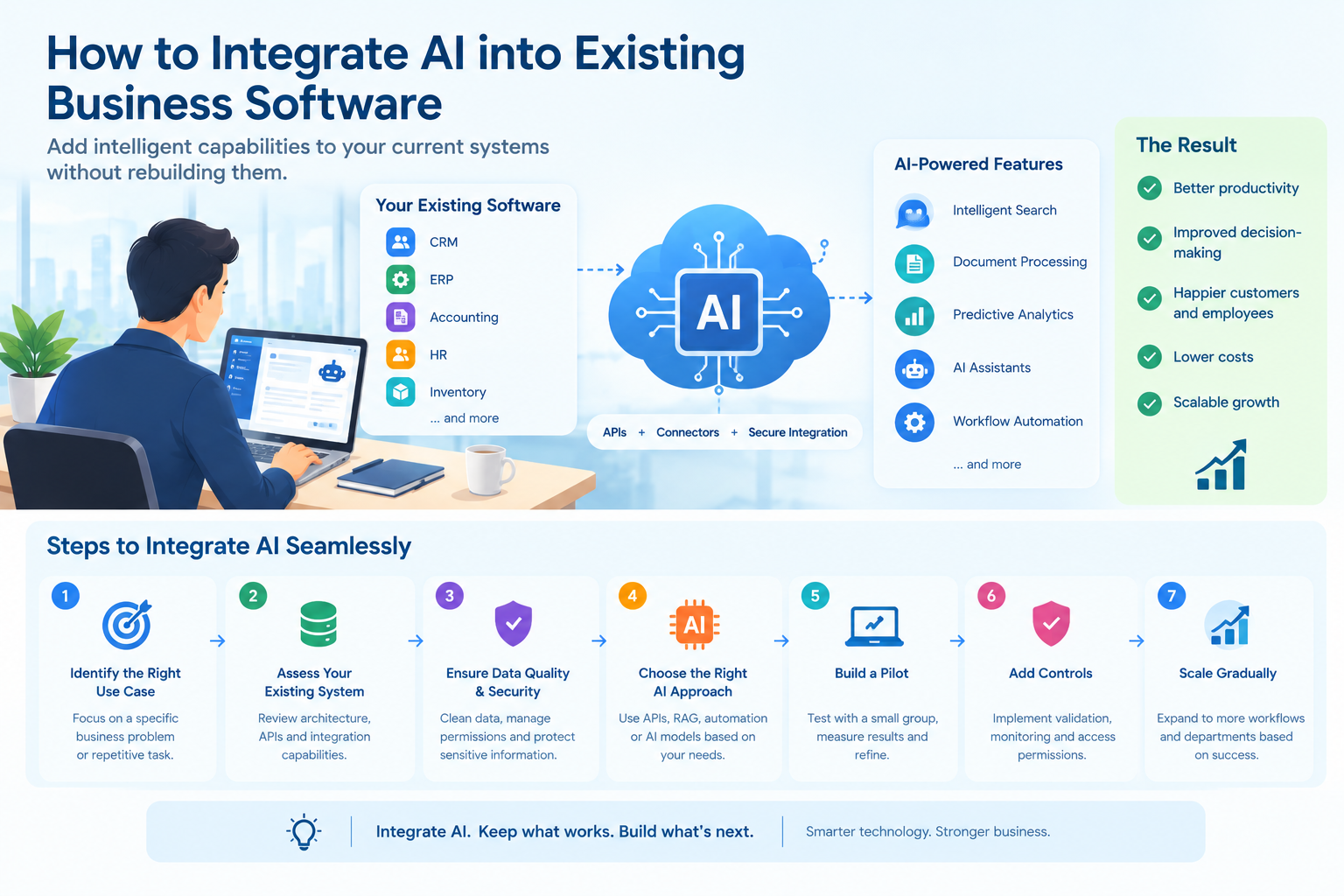
How to Implement AI Agents in Business Processes
A successful implementation begins with a specific business problem, not with the technology itself.
Step 1: Identify a Suitable Process
Look for processes that consume significant employee time, involve repeated information handling, or require coordination across multiple systems.
Customer support classification, document processing, and internal knowledge retrieval can be useful starting points.
Avoid beginning with a highly sensitive or business-critical workflow before the organization has established suitable controls.
Step 2: Map the Existing Workflow
Document how the process currently works, including the systems involved, required information, decision points, exceptions, and approval stages.
This helps identify which steps should be automated, which need AI assistance, and which must remain under human control.
Step 3: Define the Agent's Responsibilities
Specify the agent's goal, permitted tools, access rights, decision boundaries, and escalation conditions.
For example, an invoice-processing agent may be allowed to extract invoice information and prepare a payment recommendation but not independently approve payments above a defined threshold.
Step 4: Connect Business Applications
Agents often need to work with CRM platforms, accounting software, document repositories, internal databases, or other business systems.
Secure APIs and well-defined integration layers can help them exchange information without bypassing existing permissions and controls.
For businesses requiring specialized integrations, an API integration specialist can help connect applications and establish reliable data flows.
Step 5: Test With Realistic Scenarios
Before deployment, test the agent using normal requests, incomplete information, conflicting records, unusual cases, and potentially harmful instructions.
Evaluate whether it selects the correct action, respects permissions, identifies uncertainty, and escalates situations appropriately.
Step 6: Deploy Gradually
Begin with a limited pilot involving a defined process and a manageable group of users.
Initially, the agent may recommend actions without executing them. Once performance has been evaluated, organizations can gradually enable additional actions where the risk is acceptable.
Step 7: Measure Results and Improve
Monitor performance after deployment and compare the results with the original process.
Useful metrics include:
- Average process completion time.
- Number of tasks completed successfully.
- Error and rework rates.
- Escalation frequency.
- Cost per completed task.
- Employee and customer satisfaction.
- Unauthorized-action attempts and security incidents.
Use these measurements to determine whether the agent should be expanded, redesigned, restricted, or retired.
The Role of Custom Software Development in AI Automation
Off-the-shelf AI tools can support common business tasks, but organizations with specialized workflows may need custom development to connect agents to their existing applications and business rules.
Custom solutions can help businesses integrate AI capabilities into internal portals, customer-facing platforms, enterprise systems, and industry-specific applications.
For example, a lending business could use an AI agent to organize application documents, extract relevant information, identify missing records, and prepare a file for review. Existing lending rules and authorized employees would remain responsible for eligibility decisions and final approvals.
Similarly, a company managing several internal applications could deploy an agent that coordinates requests across departments while relying on established APIs, permissions, and workflow controls.
Businesses exploring these options can consider AI development services to evaluate suitable use cases and integrate AI capabilities into their software environment.
The right implementation depends on the organization's objectives, technical infrastructure, data requirements, risk tolerance, and budget. In some cases, an existing automation platform is sufficient. In others, a custom solution or a hybrid approach may provide greater flexibility.
What Businesses Should Expect From AI Agents in 2027
In 2027, a major focus will be moving from individual AI experiments to dependable, connected workflows.
Several developments are worth watching:
- Multi-agent collaboration: Specialized agents may coordinate tasks across departments. One agent could collect information, another could validate it, and a third could prepare the next workflow step under shared controls.
- More connected enterprise systems: Businesses will increasingly explore ways to connect AI capabilities with existing applications, APIs, databases, and workflow platforms.
- Greater emphasis on governance: As agents gain access to business tools, organizations will need clear permissions, activity records, monitoring, and accountability for automated decisions.
- Human-agent collaboration: Employees may increasingly supervise agents, review exceptions, and handle decisions that require professional judgment.
- Outcome-based measurement: Companies will need to evaluate agents based on measurable improvements in cost, quality, speed, and customer experience rather than usage alone.
These are emerging directions, not guaranteed outcomes for every business. Successful adoption will depend on the maturity of the technology and the organization's ability to implement it responsibly.
Conclusion
AI agents have the potential to change how businesses manage customer service, finance, HR, sales, IT operations, document management, and other processes in 2027. By combining AI reasoning with business applications and established workflows, organizations can automate more than isolated repetitive tasks.
However, effective automation requires more than deploying an AI model. Businesses must select suitable use cases, improve data quality, establish secure integrations, define decision boundaries, and maintain appropriate human oversight.
The most practical approach is to start with a clearly defined problem, test the solution on a limited scale, and expand only when measurable results justify further investment.
For organizations looking to modernize their operations, AI-powered business process automation can become a valuable part of a broader digital transformation strategy provided it is implemented with clear objectives, reliable technology, and responsible controls.
Frequently Asked Questions
1. What are AI agents in business process automation?
AI agents are software systems that interpret goals, analyze information, and take permitted actions through connected applications. They can coordinate multistep tasks and handle some variations in business workflows.
2. How can AI agents automate business processes in 2027?
Businesses can use AI agents to support customer service, invoice processing, employee onboarding, sales operations, inventory management, IT support, and document handling. Their responsibilities should be defined according to the process's risks and requirements.
3. Are AI agents better than traditional automation?
Neither approach is universally better. Traditional automation is effective for predictable, rule-based tasks, while AI agents can help with processes involving variable information and more flexible decision-making. Combining the two is often a practical option.
4. Are AI agents suitable for small businesses?
Yes. Small businesses can start with focused use cases such as responding to common customer inquiries, classifying leads, organizing documents, or summarizing internal information. A limited pilot can help establish whether the benefits justify the cost.
5. What are the main risks of using AI agents?
Key risks include incorrect outputs, unauthorized access, data exposure, unreliable integrations, unexpected actions, and rising operating costs. Testing, restricted permissions, monitoring, and human approval for high-impact decisions can help reduce these risks.
6. How can a business get started with AI agent automation?
Start by identifying a repetitive or time-consuming process, mapping its current workflow, defining the agent's responsibilities, and selecting the required integrations. Test the solution in a limited environment and measure its performance before expanding deployment.
About the author
- LnP Infotech Pvt. Ltd. is an AI technology consulting and digital solutions company based in Mohali, India, serving businesses worldwide. Founded in 2018, we specialize in custom software development, AI solutions, automation, web and mobile app development, SaaS solutions, and technology consulting. Our expertise includes finance and healthcare software, real estate technology, reporting and analytics, digital transformation, and business process automation. We help businesses modernize legacy systems, streamline operations, improve efficiency, and build scalable digital products tailored to their requirements. With an experienced technology team and a practical, future-ready approach, LnP Infotech delivers reliable software and technology solutions that support sustainable business growth.
Comments
Join the discussionThe hybrid point is the most useful one here — letting an agent interpret an invoice and flag a mismatch, rather than act on it, keeps the flexibility without giving up control. Starting with a limited pilot and measuring escalation and error rates, as you outline, is also the honest way to tell whether the automation is actually helping.
Thanks for sharing your thoughts!