
How to Integrate AI into Existing Business Software Without Rebuilding It
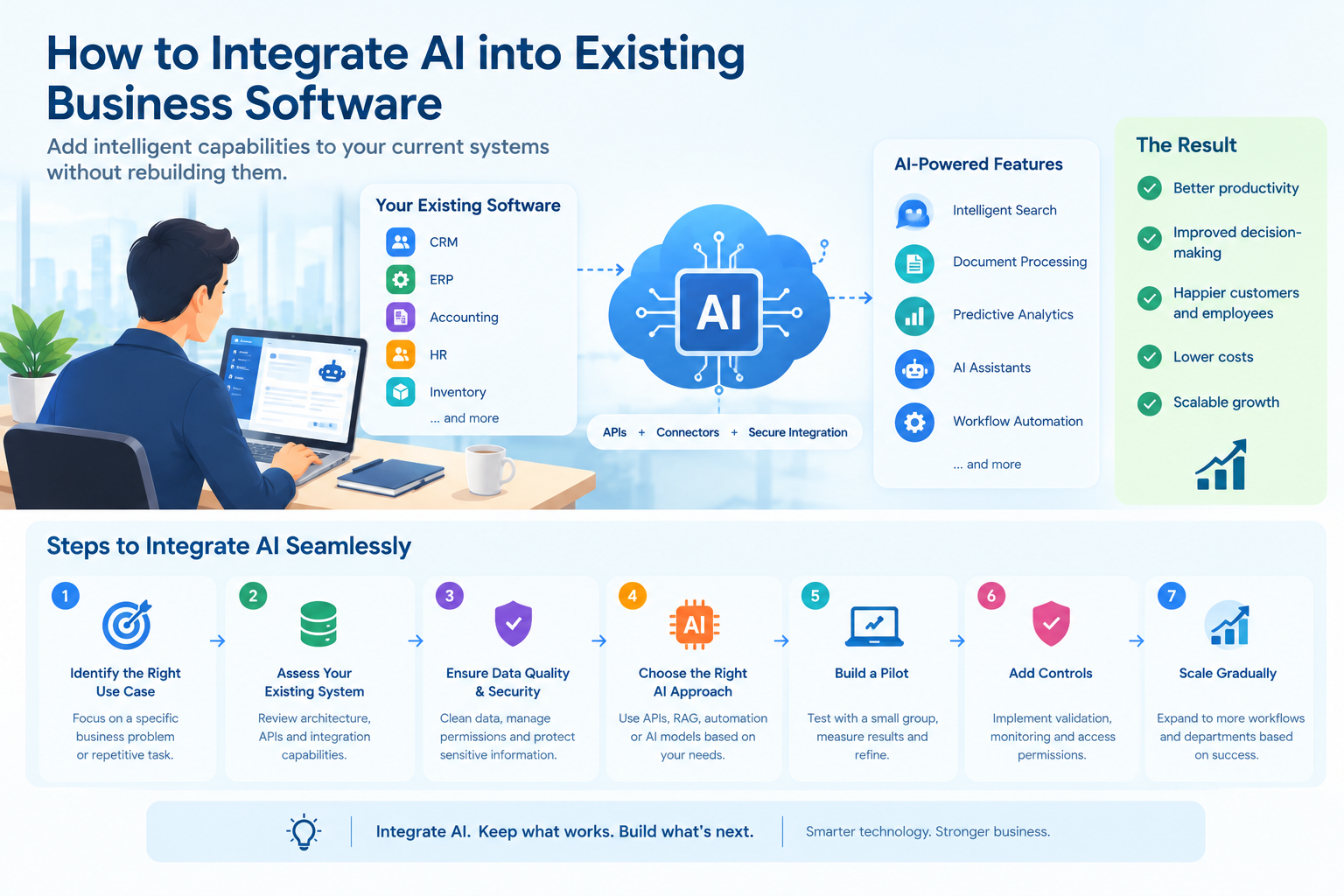
Artificial intelligence is changing how businesses manage operations, analyze data, serve customers, and make decisions. From intelligent customer support to automated document processing, AI offers opportunities to improve productivity and reduce repetitive work.
However, adopting AI does not necessarily mean replacing existing business software.
Many organizations already depend on established applications for customer relationship management (CRM), enterprise resource planning (ERP), accounting, inventory management, and internal operations. Rebuilding these systems from scratch can require significant investment, extensive testing, employee training, and operational disruption.
A more practical approach is to integrate AI into the software businesses already use.
By connecting AI capabilities through APIs, existing workflows, and secure data integrations, organizations can introduce intelligent features while preserving their core systems. The key is to identify the right use cases, choose a suitable integration method, and implement AI in a way that supports business objectives without compromising security or reliability.
Why Businesses Don't Need to Rebuild Their Existing Software
Traditional business applications often perform their core functions effectively but lack advanced capabilities such as natural language processing, intelligent search, automated classification, and predictive analysis.
For example, a CRM system may store thousands of customer records but require employees to search manually for specific information. An AI-powered feature could allow users to ask questions in natural language and retrieve relevant information from authorized records.
Similarly, an accounting application may record invoices accurately but still require employees to extract information from uploaded documents manually.
Integrating AI can help address these limitations without replacing the entire application.
Businesses can preserve their existing databases, user interfaces, business rules, and workflows while introducing AI services where they provide the most value.
This approach offers several potential advantages:
- Lower disruption: Core business processes can continue operating while new capabilities are introduced.
- Incremental investment: Organizations can begin with a small project instead of funding a complete system replacement.
- Faster experimentation: Teams can test specific AI use cases before expanding implementation.
- Better use of existing data: AI can help employees find, interpret, and organize information already stored in business systems.
- Flexible expansion: Successful integrations can be extended to additional departments and workflows.
The objective is not to add AI everywhere. It is to improve specific processes where intelligent automation can deliver measurable benefits.
6 Practical Ways to Integrate AI into Existing Business Software
1. Connect AI Through APIs
An application programming interface (API) allows different software systems to communicate with each other. APIs provide one of the most straightforward ways to introduce AI into an established application.
Instead of embedding an AI model directly into the core software, developers can create an integration layer that sends selected information to an AI service and returns the result to the existing application.
For example, an e-commerce platform could use an AI API to classify customer inquiries, summarize support conversations, or draft responses for customer service representatives.
A typical workflow might look like this:
- A user submits a request through the existing application.
- The application sends the relevant information to an AI service through a controlled API.
- The AI processes the request and returns a result.
- The application validates the result and displays it to the user.
- The user reviews or approves the result when necessary.
This approach allows businesses to add new capabilities without redesigning their entire software architecture.
However, developers should account for authentication, response times, API rate limits, service availability, and usage costs. They should also validate AI-generated outputs before allowing them to influence important business processes.
2. Add AI-Powered Search to Business Applications
Many organizations store valuable information across documents, customer records, knowledge bases, product catalogs, and internal databases.
Traditional search often depends on exact keywords or predefined filters. This can make it difficult for employees to find information when they do not know the precise wording used in a document.
AI-powered search can help users find relevant information based on meaning and context.
For example, an employee using an internal knowledge portal might ask, "What is our procedure for handling a delayed customer order?"
Rather than searching through multiple documents manually, the employee could receive a response based on relevant internal policies and procedures.
One approach is retrieval-augmented generation (RAG). This architecture retrieves relevant information from approved data sources and provides it to an AI model as context for generating a response.
RAG is useful when answers need to reflect an organization's own documentation rather than relying solely on information learned during model training. It can also make it easier to update the knowledge source without retraining the underlying model. However, the quality of responses still depends on retrieval accuracy, data quality, permissions, and model behavior.
Businesses should ensure that search results respect existing access permissions. An AI assistant should not reveal confidential information simply because that information exists somewhere in the company's database.
3. Automate Document Processing and Data Entry
Document-heavy workflows are common in finance, logistics, healthcare administration, insurance, and many other industries.
Employees may need to review invoices, purchase orders, contracts, application forms, and reports before transferring information into business software.
AI can help extract relevant information, classify documents, summarize content, and identify missing fields.
Consider a business that receives hundreds of supplier invoices each month. Employees may need to identify invoice numbers, dates, supplier names, totals, and payment terms before entering the information into an accounting system.
An AI-assisted workflow could:
- Extract relevant fields from uploaded documents.
- Classify documents by type.
- Identify missing or inconsistent information.
- Compare extracted values against predefined business rules.
- Send uncertain cases to an employee for review.
- Transfer validated information into the existing application.
This can reduce repetitive data entry and help employees process documents more efficiently.
However, extracted information should not automatically be treated as accurate. Validation rules and human review remain important, particularly when documents affect payments, legal obligations, or regulatory records.
4. Introduce Predictive Analytics
Existing business applications often collect large amounts of operational data but provide limited forecasting capabilities.
AI and machine learning can help analyze historical patterns to estimate future outcomes, identify anomalies, or highlight potential risks.
For example, a retail inventory system could use historical sales, seasonal trends, and stock movement data to estimate future product demand.
Similarly, a service business could analyze past customer interactions to identify patterns associated with cancellations or delayed payments.
Potential applications include:
- Demand forecasting
- Inventory planning
- Customer churn analysis
- Sales forecasting
- Unusual transaction detection
- Equipment maintenance predictions
- Workload and resource planning
Predictive capabilities can be introduced as a separate service that reads approved data from the existing application and returns forecasts or risk indicators.
The application can then display these insights through its current dashboard.
It is important to remember that predictions are estimates, not guarantees. Businesses should evaluate model performance using relevant historical and real-world data, monitor results over time, and avoid relying on predictions without appropriate business context.
5. Add AI Assistants to Existing Workflows
AI assistants can help employees interact with business applications using natural language.
Instead of navigating several menus or running complex reports, users may be able to ask questions, request summaries, or initiate supported tasks through a conversational interface.
For example, a sales manager could ask an AI assistant to summarize recent customer interactions before a meeting.
A project manager might request a summary of overdue tasks, while a support representative could ask for a draft response based on an approved knowledge base.
AI assistants can support tasks such as:
- Summarizing customer histories
- Drafting emails and business documents
- Explaining reports in plain language
- Finding information across connected systems
- Preparing meeting summaries
- Recommending next steps based on defined criteria
More advanced assistants can interact with existing application APIs to perform specific actions. However, access to business systems must be tightly controlled.
Businesses implementing AI-powered assistants, intelligent automation, or integrations with existing applications may benefit from working with an experienced team offering hire affordable AI specialist services.
An assistant that can read customer records should not automatically have permission to change account details, issue refunds, approve transactions, or delete records.
For consequential actions, organizations should use explicit authorization checks, narrowly scoped permissions, validation rules, and human approval where appropriate.
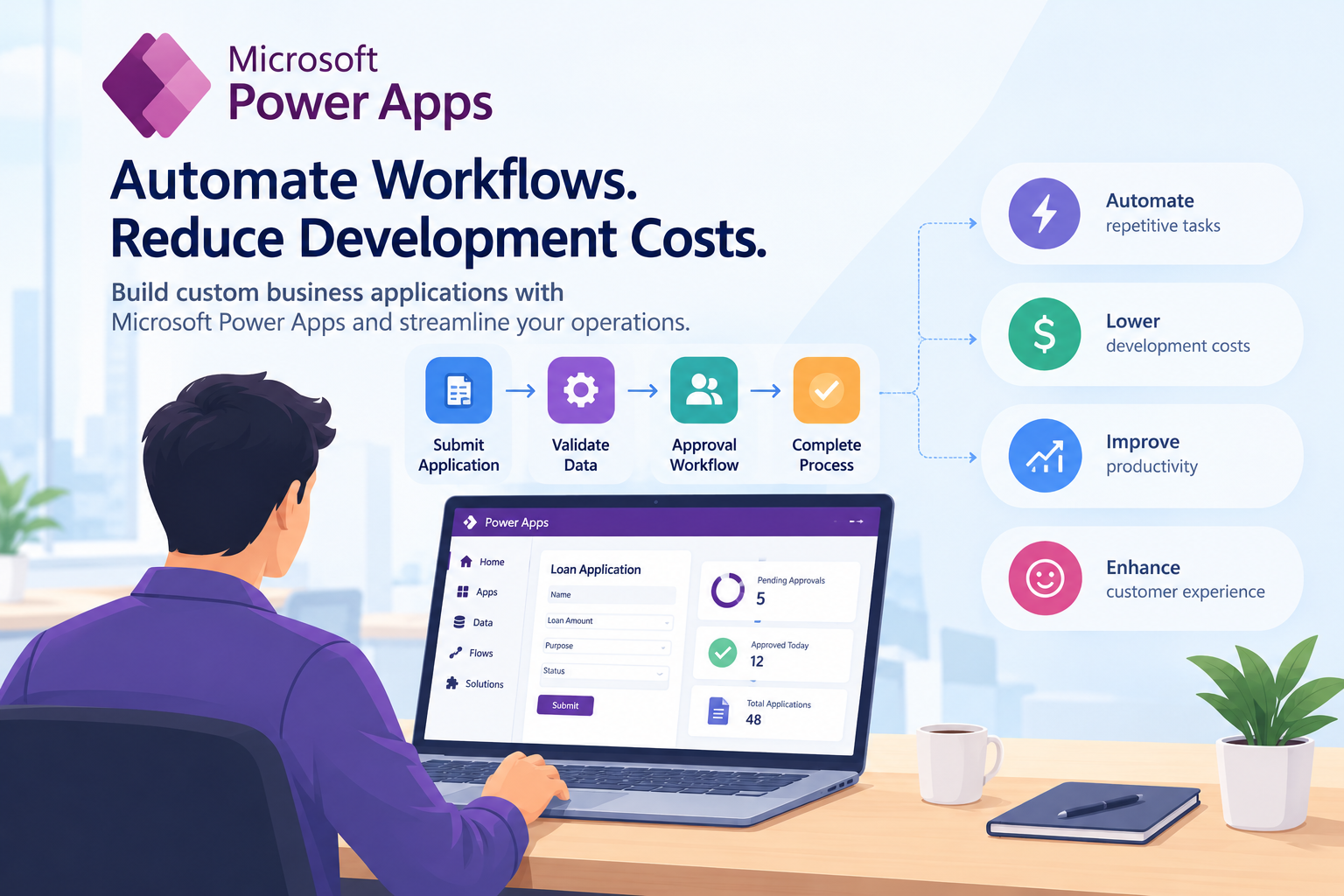
6. Integrate AI into Existing Low-Code Applications
Businesses using low-code platforms can also introduce AI without replacing their existing applications.
Low-code tools often support APIs, connectors, automated workflows, and configurable interfaces. These capabilities can provide a foundation for integrating AI into internal business applications.
For example, an organization might use a low-code application to manage employee requests. An AI service could classify incoming requests, summarize descriptions, or suggest the appropriate department.
The existing application would continue managing users, records, permissions, and workflow status, while the AI service would handle the specific intelligent task.
This separation can make the solution easier to maintain and test.
Businesses evaluating customized workflows can explore low-code development approaches alongside their existing software architecture. The most suitable option depends on the platform's integration capabilities, data requirements, licensing, and the complexity of the workflow.
Businesses looking to extend their existing applications can explore hire low code no code development India to support workflow automation, application integration, and the development of business solutions tailored to their operational needs.
A Step-by-Step Approach to AI Integration
Successful AI integration begins with business requirements rather than a particular model or technology.
A structured implementation process helps organizations reduce unnecessary complexity and assess whether the solution delivers meaningful value.
Step 1: Identify a Specific Business Problem
Start with a task that consumes time, involves repetitive work, or requires employees to interpret large amounts of information.
Examples include sorting support tickets, extracting invoice data, searching internal documents, or summarizing customer interactions.
Define the problem clearly before choosing an AI solution.
Step 2: Assess the Existing Software Architecture
Review the application's technology stack, databases, APIs, authentication mechanisms, and integration capabilities.
Determine whether the system can safely expose the data and functions required for the proposed AI feature.
If the application lacks suitable APIs, developers may need to create a controlled integration layer or adapter rather than modifying fragile core components.
Step 3: Evaluate Data Quality and Permissions
AI systems depend on appropriate input data. Outdated records, inconsistent formats, missing fields, and duplicate information can reduce the usefulness of AI-generated results.
Identify which data sources the feature requires and confirm that the organization has appropriate authorization to process the information.
Sensitive information should be minimized, and existing access restrictions should remain effective throughout the integration.
Step 4: Select the Right AI Approach
Different tasks require different technologies.
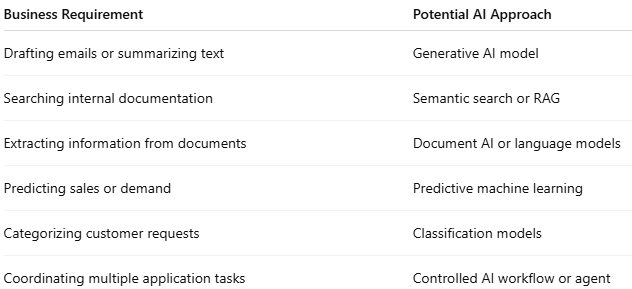
The simplest approach that meets the business requirement is often the best starting point.
Step 5: Build a Small Pilot
Rather than introducing AI across the entire organization immediately, test one workflow with a limited group of users.
For example, a company could first introduce AI-assisted support ticket classification for one department.
Compare its performance with the existing process and assess accuracy, processing time, user satisfaction, and operational cost.
A pilot also helps uncover integration problems before they affect a larger number of users.
Step 6: Add Security and Validation Controls
AI integration introduces risks that differ from those of conventional application features.
Organizations should implement appropriate controls, including:
- Authentication and authorization for API access
- Encryption for data in transit and at rest
- Input validation and output checking
- Protection against prompt injection and unsafe tool use
- Logging and monitoring of relevant operations
- Data retention and privacy controls
- Rate limits and usage monitoring
- Human review for consequential decisions
- Fallback procedures if the AI service becomes unavailable
The National Institute of Standards and Technology's Generative AI Profile provides a framework for identifying and managing risks associated with generative AI systems throughout their lifecycle.
Step 7: Measure Results and Expand Gradually
Once the pilot is operating, evaluate whether it achieves the intended business outcome.
Useful metrics may include processing time, error rates, employee workload, customer response times, cost per transaction, and user adoption.
If the results justify further investment, expand the feature to additional workflows or departments.
Continuous monitoring is important because data, user behavior, models, and external services can change over time.
Common Challenges Businesses Should Prepare For
Although integrating AI can be more manageable than rebuilding an entire application, it still requires careful planning.
- Legacy system limitations: Older applications may lack modern APIs or reliable documentation. A separate integration layer may help connect AI services without making extensive changes to the core application.
- Poor data quality: Inconsistent or outdated records can lead to unreliable outputs. Data cleanup and validation should be part of the project plan.
- Security and privacy risks: Sending confidential business information to an external AI provider requires careful evaluation of data handling, contractual terms, access controls, and applicable regulations.
- Incorrect AI-generated results: AI systems can produce plausible but inaccurate information. Outputs should be checked according to the consequences of an error.
- Integration costs: Model usage, API calls, infrastructure, monitoring, and maintenance can create ongoing expenses. Organizations should estimate total operating costs rather than focusing only on initial development.
- Employee adoption: Employees need to understand what the new feature can do, where its limitations lie, and when human judgment is necessary.
Addressing these challenges early can help businesses build AI features that are useful, maintainable, and aligned with operational requirements.
Conclusion
Integrating AI into existing business software does not require starting from scratch. Businesses can preserve their established applications and introduce intelligent capabilities through APIs, AI-powered search, document processing, predictive analytics, and workflow assistants.
The most effective approach is to start with a specific business problem, assess existing systems and data, choose an appropriate integration method, and test the solution through a controlled pilot.
Security, output validation, access permissions, monitoring, and human oversight should be included from the beginning rather than added after deployment.
For organizations with complex requirements, working with an experienced development team can help ensure that AI capabilities fit the existing architecture and business processes. Customized integrations can connect established systems with new AI services while keeping core operations stable.
For organizations with complex technical requirements, custom software development services can help connect existing applications with new AI capabilities while maintaining compatibility with established business workflows. It is about making existing software more useful, responsive, and capable of supporting changing business needs.
About the author
- LnP Infotech Pvt. Ltd. is an AI technology consulting and digital solutions company based in Mohali, India, serving businesses worldwide. Founded in 2018, we specialize in custom software development, AI solutions, automation, web and mobile app development, SaaS solutions, and technology consulting. Our expertise includes finance and healthcare software, real estate technology, reporting and analytics, digital transformation, and business process automation. We help businesses modernize legacy systems, streamline operations, improve efficiency, and build scalable digital products tailored to their requirements. With an experienced technology team and a practical, future-ready approach, LnP Infotech delivers reliable software and technology solutions that support sustainable business growth.
Comments
Join the discussionNo comments yet. Be the first to comment.